
Whether you’re designing a new server room, replacing aging HVAC equipment, or adding cooling redundancy to an existing IT environment, accurately determining the server room heat load is one of the most important steps in selecting the proper cooling solution.
Why Heat Load Matters
Unlike office spaces, where occupants, solar radiation through windows, and heat transfer from exterior walls and roofs all contribute to heat loads, dedicated server rooms generate heat almost entirely from IT equipment. Servers, switches, routers, storage devices, and other network equipment continuously convert electrical energy into thermal energy that must be removed to maintain reliable operating temperatures.
Knowing the true heat load allows contractors and IT professionals to:
- Properly size dedicated server room cooling equipment
- Improve cooling performance and efficiency
- Prevent costly overdesign
- Increase system reliability
- Plan for future IT expansion
An undersized cooling system can lead to equipment overheating, unexpected downtime, and reduced IT equipment lifespan. Conversely, an oversized system increases installation costs, energy consumption, and unnecessary operating expense, not to mention possibly result in premature air conditioner failure.
Converting Heat Load to Cooling Capacity
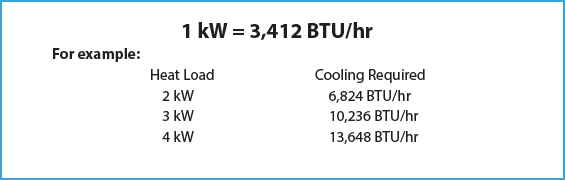
Before reviewing methods of calculating heat loads, it is important to keep the following conversion in mind when determining cooling capacity.
Three Proven Methods for Accurately Sizing IT Cooling Systems
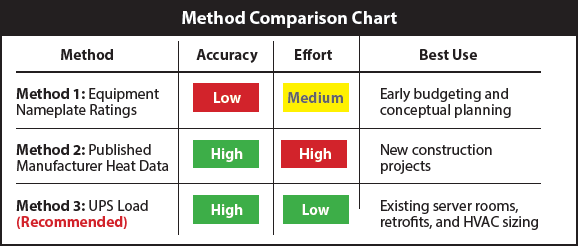
There are three commonly used methods for calculating heat load used by industry professionals. However, based on required effort as well as overall accuracy achieved, one preferred method tends to stand out from the others.
Method 1
Equipment Nameplate Power Ratings
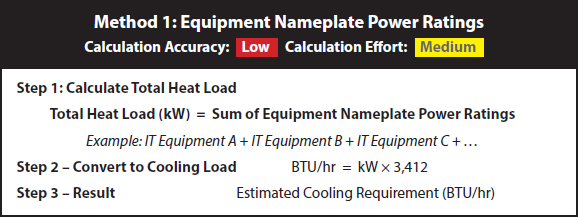
The simplest approach is to inventory each piece of IT equipment and total the maximum power ratings listed on the equipment nameplates.
Advantages
- Easy to perform
- No special monitoring equipment required
- Useful during preliminary planning
Limitations
This method almost always overestimates the actual cooling requirement. Manufacturers typically install power supplies capable of delivering much more power than the equipment consumes during normal operation. As a result, nameplate calculations often produce cooling loads that are significantly higher than real-world operating conditions, potentially leading to oversized HVAC equipment and unnecessary project costs.
Method 2
Manufacturer Published Heat Dissipation
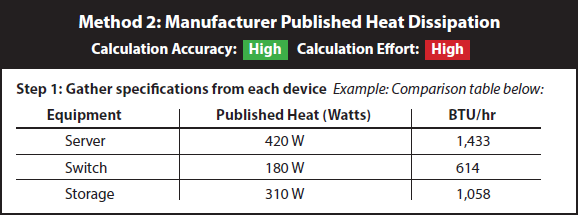
Many server and networking equipment manufacturers publish measured heat dissipation or typical operating power within their technical documentation. Using these published values provides a much more accurate estimate than relying on nameplate ratings.
Advantages
- Highly accurate
- Reflects actual operating conditions
- Helps avoid oversized cooling systems
Limitations
The information can be difficult to locate, especially when equipment comes from multiple manufacturers. Gathering specifications for every device can become time-consuming, making this method better suited for new construction projects.
Method 3
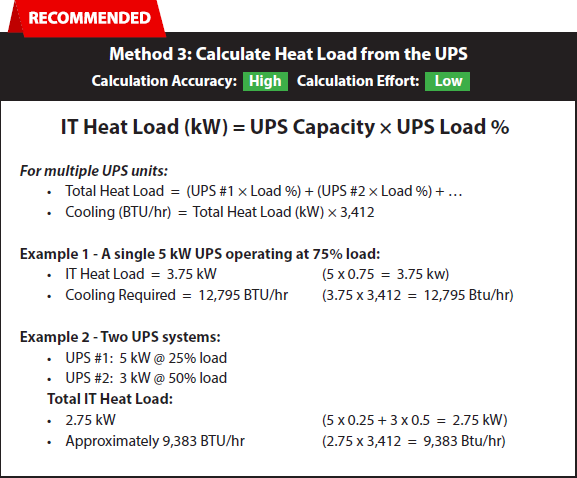
Calculate Heat Load from the UPS
For most existing server rooms, the easiest and most accurate way to estimate heat load is by using the load displayed on the Uninterruptible Power Supply (UPS).
Because nearly all critical IT equipment receives power through the UPS, the UPS load closely represents the actual electrical power being consumed by the network. Since nearly all electrical energy used by IT equipment is converted directly into heat, the UPS load provides an excellent estimate of the cooling requirement. For existing server rooms where nearly all IT equipment is powered through a monitored UPS, this method typically provides the most practical balance of accuracy and simplicity.
Instead of creating a complete equipment inventory or searching through specification sheets, simply read the UPS load and calculate the total IT power.
Why This Method Is Preferred
- High accuracy with minimal effort
- Uses actual operating conditions
- No equipment inventory required
- Reflects real-time network utilization
- Ideal for retrofit projects and existing server rooms
- Can typically be completed in just a few minutes
Although UPS loading changes slightly throughout the day as server utilization varies, these fluctuations are typically small. For the vast majority of existing server rooms, the UPS method provides the best balance of speed, simplicity, and accuracy.
Choosing the Right Method
For most HVAC contractors, mechanical engineers, and IT professionals evaluating an existing server room, using the UPS load delivers the quickest path to an accurate cooling estimate with the least amount of effort.
Final Thought
It’s important to account for future IT expansion when selecting cooling equipment. Many facilities experience gradual increases in server density over time, making modest capacity planning a smart long-term investment.
By selecting the appropriate calculation method for the application, HVAC contractors, mechanical contractors, and IT professionals can confidently size cooling systems that protect mission-critical equipment, improve energy efficiency, and support long-term infrastructure reliability.
The Clear Choice
When it comes to keeping mission-critical data rooms and server racks operational, trust the one cooling system that delivers the most value. From simplified installations that save time and money, to exceptional quality, dependability, and reduced maintenance that only DENSO can deliver, EdgeCool is the clear choice.
The Clear Choice
Above Rack
Inside Rack
Multi Rack
The Clear Choice
When it comes to keeping mission-critical data rooms and server racks operational, trust the one cooling system that delivers the most value. From simplified installations that save time and money, to exceptional quality, dependability, and reduced maintenance that only DENSO can deliver, EdgeCool is the clear choice.